Exporting
As plugin
Export a plugin that imports its own bundle: install it on the other site, check what it needs, Run import, then delete it.
As plugin, next to Media files in the Export screen’s Details panel, makes the file a plugin .zip holding the bundle. Install it on the other site like any plugin, and it imports itself — no file to upload, no importer screen to go through.
What’s inside
mysite-wordpress-2026-10-12.zip
└── mysite-wordpress-2026-10-12-k3x9q2m7a1b8c4d6/
    ├── mysite-wordpress-2026-10-12-k3x9q2m7a1b8c4d6.php   the plugin: "Import: mysite-wordpress-2026-10-12"
    ├── readme.txt                                         what it is, as WordPress.org's Plugin Check asks
    └── mysite-wordpress-2026-10-12-k3x9q2m7a1b8c4d6.wxrz  the bundle (content, media, settings, as chosen)
The plugin’s folder and file are named after the export’s file name, plus the random part of the copy’s name in lowercase (the same one Copies shows). So no file name can turn it into another plugin: an export named woocommerce is still woocommerce-<random>/, never WooCommerce’s folder. Each delivery installs as its own plugin.
Settings → Export → As plugin holds the bundle as can put the bundle’s files in the plugin instead of the .wxrz — the same entries, the WXR formatted line by line, to look at or change before installing. Next to the plugin’s, the plugin’s folder is the bundle:
mysite-wordpress-2026-10-12.zip
└── mysite-wordpress-2026-10-12-k3x9q2m7a1b8c4d6/
    ├── mysite-wordpress-2026-10-12-k3x9q2m7a1b8c4d6.php
    ├── manifest.json
    ├── mysite.WordPress.2026-10-12.xml
    ├── post_content/home.html
    ├── options.json
    └── uploads/2026/10/photo.jpg
In a bundle/ folder, the same files go under bundle/, apart from the plugin’s. The plugin’s header (Eizport Bundle:) names manifest.json or bundle/manifest.json.
The default stays one .wxrz: a smaller download, and the files can’t be told apart from the plugin’s. Either way, the files are reachable by URL while the plugin is installed — delete it after the import. It doesn’t work with the Playground format: the toggle is off and disabled there.
On the other site
- Plugins → Add Plugin → Upload Plugin, choose the
.zip, Install Now, Activate. - A notice and an Import link in the plugin’s row lead to its screen, Tools → Import: EIZP-000. Nothing redirects you on activation.
- The screen lists what it needs, each with a ✓ or a link:
- Eizport, active — it draws the screen and runs the import. Without it, the plugin shows how to activate or install it;
- the WordPress Importer, installed — with an Install Now button that installs and activates it right there, like Tools → Import installs an importer (Installing…, Activating…, then ✓ and Run import ready);
- the bundle, with its size and date;
- Update pages, posts and products that already exist (same slug), checked when the export had Update existing on (the plugin’s
Eizport Update:header). See updating items that already exist.
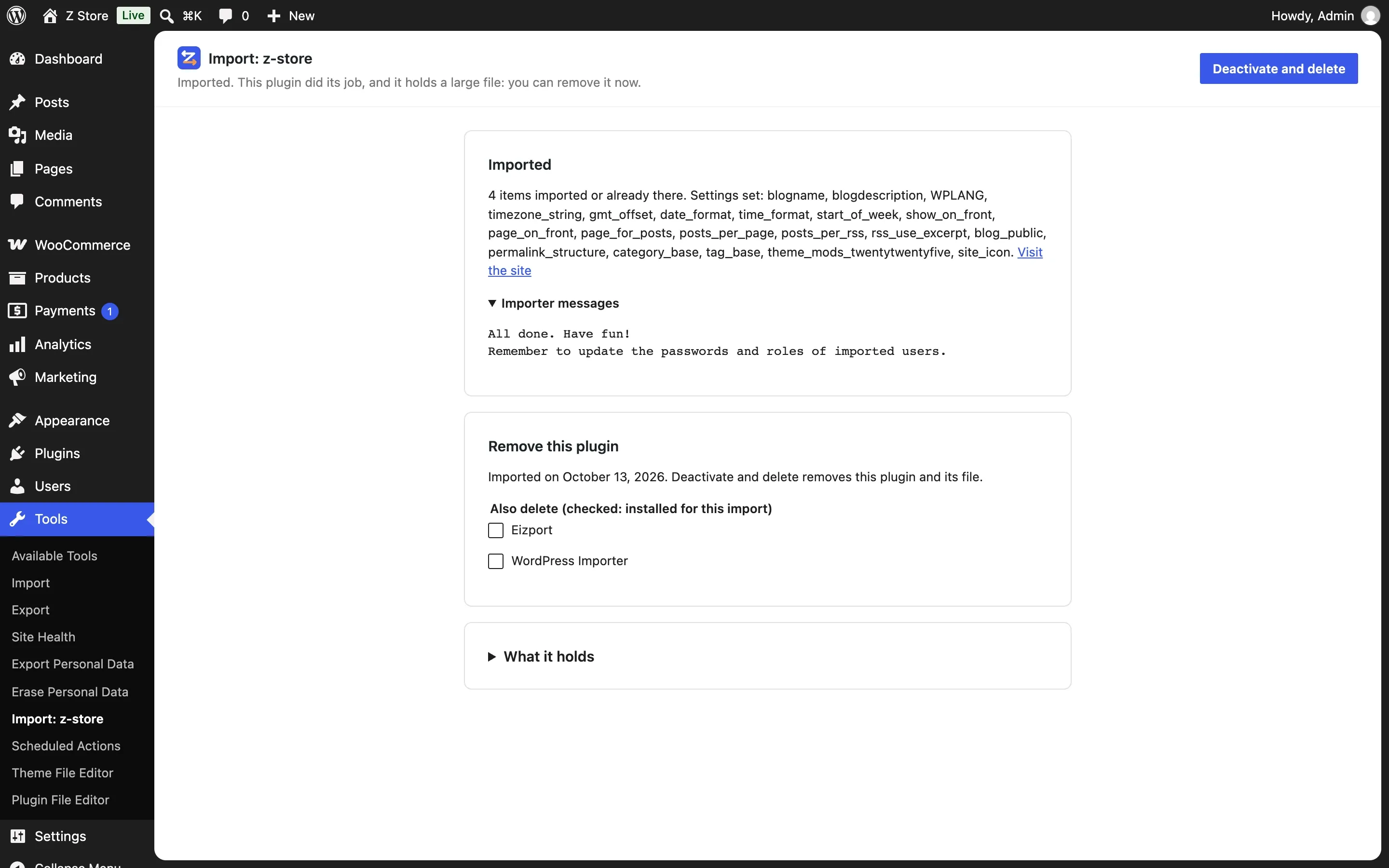
- Run import imports the bundle the plugin holds. The page waits while it runs (the WordPress Importer doesn’t report progress), then shows how many items were imported, the settings set and the importer’s messages.
- Once imported, the screen’s main button is Deactivate and delete: it did its job and holds a large file. Under Also delete, Eizport and the WordPress Importer can go in the same action — checked when they were installed for this import (the plugin notes, when activated, which were already there), unchecked otherwise. Where WordPress asks for FTP credentials to delete files, it is deactivated and you delete it from the Plugins screen.
After the import the screen doesn’t offer to import again, unless the export had Settings → Export → As plugin: allow importing again on: then Import again stays, folded. Importing again finds the items already imported and doesn’t duplicate them; with Update existing, a new delivery of the same content updates them.
The plugin is named after the export’s file: Import: EIZP-000 for EIZP-000.zip.
The same .zip also imports without installing it: upload it in Tools → Import → WordPress, like a .wxrz, or give it to wp eizport import. Eizport takes the bundle out of the plugin.
Without Eizport, the screen says how to get it: Install Now once Eizport is in the plugin directory — it installs and activates Eizport on the same screen, then Continue opens the import — until then its latest release to download and add in Upload Plugin.
Safety
The plugin imports only the bundle its own header names (Eizport Bundle:), from its own folder. Run import needs the import capability and a nonce; deleting needs delete_plugins. The plugin’s code is a small file anyone can read; it downloads nothing.
In Copies it shows as Plugin .zip: it can be downloaded, not imported into the same site — install it as a plugin instead.