Exporting
Options
Export site settings one by one, by group or all at once; linked settings; what is never exported; how IDs are mapped.
The Options row exports site settings in an options.json inside the bundle, set on the other site when the import ends.
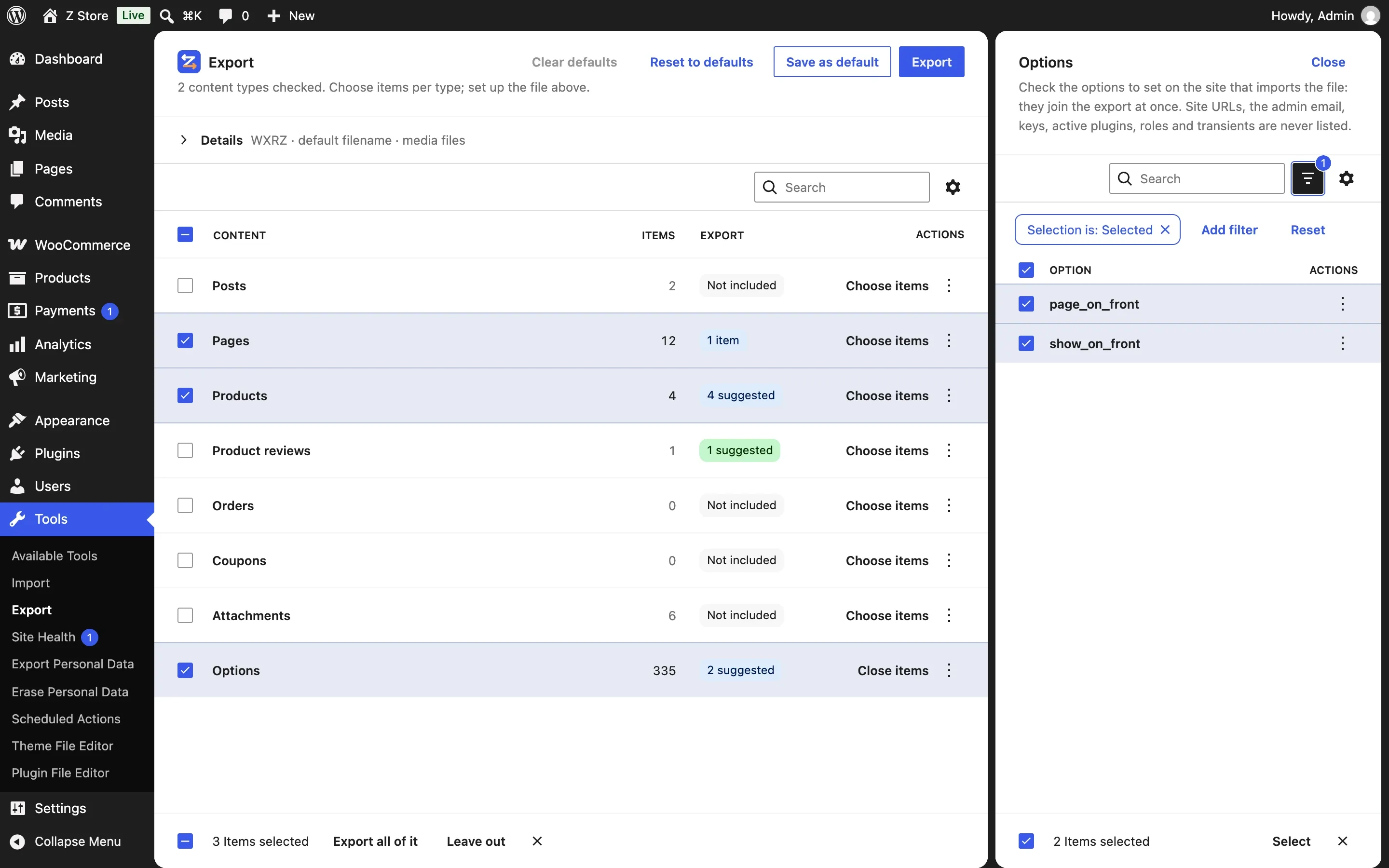
Three ways to choose
- One by one — every option the site has (search, pages), each with its size and an IDs mapped on import badge when it holds a post ID.
- By group — filter the panel by a group and export it: Basics (suggested), Reading, General, Permalinks, Discussion, Media, Privacy, Theme customizations, WooCommerce pages. A group is resolved when the file is made, so it follows the active theme.
- All — every option that may be exported.
On the new screen, checking an option in the panel adds it at once (the Selection filter shows the ones chosen); groups and all come from saved defaults or the classic screen. With nothing chosen yet, the panel opens on Basics: title, tagline, language, time zone, date formats, homepage and posts page, posts per page, permalinks, theme customizations and site icon.
Linked settings
Some options point to a post: page_on_front, page_for_posts, wp_page_for_privacy_policy, site_icon, WooCommerce’s page IDs. When the post is exported, those options can come along — with the ones they need, like show_on_front.
On the new screen they are suggested: choose the homepage and the unchecked Options row shows 2 suggested (page_on_front and show_on_front, counted, not named). Check the row and they go with the export; the row still says 2 suggested (plus groups or N items you chose). Uncheck one of them in its panel and the rest become plain items — 1 item. Leave the row unchecked and they don’t go.
The setting decides when they are suggested or added:
| Mode (Settings → Export) | When |
|---|---|
| When items are checked, and on export (default) | Suggested in the Options row when you check an item with a role; on the classic screen and in the ability, also added when the file is made — for items exported by filters or with all content |
| When items are checked | Suggested from the side panel’s selection |
| On export | Only when the file is made (classic screen, ability) |
| Never | You choose every option yourself |
Never exported
Site URLs (siteurl, home), the admin email, keys and salts, active_plugins, roles (<prefix>user_roles), who may register and as what (users_can_register, default_role), cron, rewrite_rules, database versions, mail server credentials, the plugin’s own settings, and every transient. Plugins add theirs with eizport_denied_options; WordPress’s own can’t be removed.
An import never sets WordPress’s own either, whatever the bundle holds: a bundle is a file anyone could have written.
IDs on import
options.json lists, under post_ids, the options that hold a post ID. On import each one gets the ID the importer gave that post; if the post wasn’t imported, the option is left out rather than pointing to the wrong thing. theme_mods_<theme> values are mapped too (logo, menus).